MASTG-TECH-0170: Enumerating App Extensions
App extensions are bundled inside their containing app under the PlugIns/ directory, each as a separate bundle with the .appex suffix (see App Extensions). This technique enumerates the extensions an app ships and inspects their configuration.
Listing the Bundled Extensions
If you have the original source code, search for all occurrences of NSExtensionPointIdentifier in Xcode (cmd+shift+f) or open "Build Phases / Embed App Extensions":
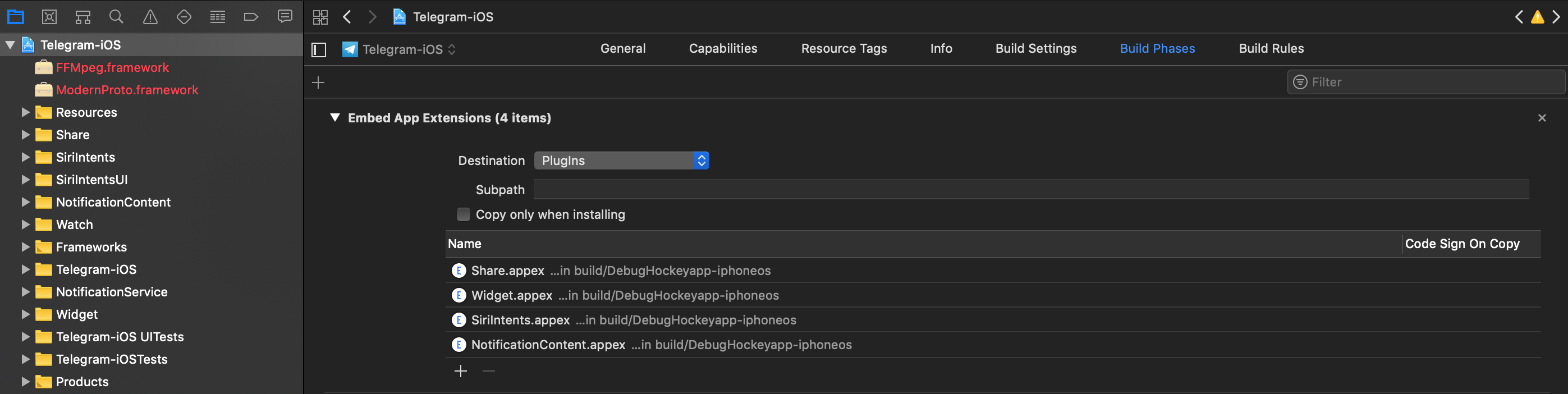
There you find the names of all embedded app extensions followed by .appex and can navigate to each one in the project.
Without the source code, explore the app package ( Exploring the App Package) and list the contents of the PlugIns/ directory inside the .app bundle:
$ ls -1 "Payload/Telegram X.app/PlugIns"
NotificationContent.appex
Share.appex
SiriIntents.appex
Widget.appex
Alternatively, grep for NSExtensionPointIdentifier across the app bundle to locate the extensions' Info.plist files:
$ grep -nr NSExtensionPointIdentifier "Payload/Telegram X.app/"
Binary file Payload/Telegram X.app//PlugIns/SiriIntents.appex/Info.plist matches
Binary file Payload/Telegram X.app//PlugIns/Share.appex/Info.plist matches
Binary file Payload/Telegram X.app//PlugIns/NotificationContent.appex/Info.plist matches
Binary file Payload/Telegram X.app//PlugIns/Widget.appex/Info.plist matches
Binary file Payload/Telegram X.app//Watch/Watch.app/PlugIns/Watch Extension.appex/Info.plist matches
On a jailbroken device you can do the same over SSH or with objection by navigating to the app bundle and listing PlugIns/.
Identifying the Extension Type
Each extension declares its type via the NSExtensionPointIdentifier key in its Info.plist ( Retrieving Info.plist Files, Analyzing Info.plist Files). The value identifies the extension point, for example com.apple.share-services for a share extension, com.apple.keyboard-service for a custom keyboard, or com.apple.widgetkit-extension for a widget.
Determining the Supported Data Types
Share and action extensions declare the data types they accept via the NSExtensionActivationRule key in their Info.plist. The rule lists the supported Uniform Type Identifiers (UTIs) and the maximum item counts:
<key>NSExtensionAttributes</key>
<dict>
    <key>NSExtensionActivationRule</key>
    <dict>
        <key>NSExtensionActivationSupportsImageWithMaxCount</key>
        <integer>10</integer>
        <key>NSExtensionActivationSupportsMovieWithMaxCount</key>
        <integer>1</integer>
        <key>NSExtensionActivationSupportsWebURLWithMaxCount</key>
        <integer>1</integer>
    </dict>
</dict>
Only the data types present here and not set to 0 as MaxCount are supported. More complex matching is possible with a predicate string evaluated against the offered UTIs. As described in App Extensions, this rule controls when the extension is offered to the user (for example, in the share sheet); it is not an access-control boundary on the data.
Detecting Shared Containers and Keychain Access Groups
An app and its extensions can share data through App Groups and the Keychain. Inspect the entitlements of the main app and of each .appex (extract the embedded entitlements from the binary with Exploring the App Package, or read embedded.mobileprovision) for:
com.apple.security.application-groups: the App Group identifiers backing the shared container (UserDefaults(suiteName:),FileManager.containerURL(forSecurityApplicationGroupIdentifier:), or a shared Core Data store).keychain-access-groups: the Keychain Access Groups used to share Keychain items between the app and its extensions.
Matching identifiers across the app and an extension indicate which data-sharing channels are configured between them.