MASTG-KNOW-0082: App Extensions
Starting with iOS 8, Apple introduced App Extensions. App extensions let an app offer custom functionality and content to users while they interact with other apps or the system. Each extension implements a single, well-scoped task, for example defining what happens after the user taps the "Share" button, providing the content of a widget, or implementing a custom keyboard.
Each extension has exactly one type, defined by its NSExtensionPointIdentifier (the so-called extension point). Some notable types are:
- Custom Keyboard: replaces the iOS system keyboard with a custom keyboard for use in all apps.
- Share: posts to a sharing website or shares content with others.
- Action: manipulates or views content originating in a host app.
- Today (widgets): shows content or performs quick tasks in the Today view and on the Home Screen.
How App Extensions Interact with Other Apps
Three roles are involved:
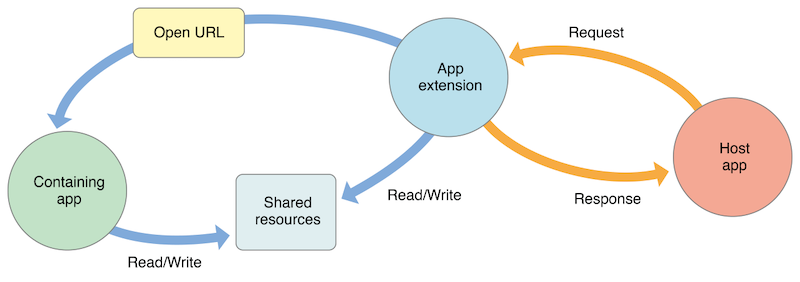
- App extension: the binary bundled inside a containing app. Host apps interact with it.
- Host app: the (often third-party) app that triggers the app extension. For example, the app whose share sheet the user opens.
- Containing app: the app that ships the app extension bundled inside it.
For example, the user selects text in the host app, taps the "Share" button, and selects an app or action from the list. This triggers the app extension of the corresponding containing app. The extension displays its view in the context of the host app and uses the items the host app provides (the selected text in this case) to perform its task. The following figure from the Apple App Extension Programming Guide summarizes this interaction:
Process Model and Sandboxing
An app extension runs as its own process, separate from both its containing app and the host app, and each has its own sandbox:
- An app extension never communicates directly with its containing app. Typically, the containing app is not even running while the extension is. Shared state is usually handled through an App Group shared container, and shared keychain items through a Keychain Access Group.
- An app extension and the host app communicate through system mediated inter-process communication, using the higher level APIs provided by the extension point and the system. See Apple's App Extension Programming Guide and Apple Platform Security.
- An app extension's containing app and the host app do not communicate at all.
The platform also restricts what extensions can do. For example:
- app extensions cannot access some APIs, such as APIs marked unavailable to extensions or unavailable frameworks like HealthKit in the older iOS app extension model
- cannot receive data through AirDrop, although they can send it
- cannot run long running background tasks, although they can start uploads and downloads with
URLSession - cannot access the camera or microphone on iOS, except for iMessage app extensions with the required usage descriptions. See Apple's "Some APIs Are Unavailable to App Extensions" and "Creating an App Extension".
There used to be a special type of app extension called a "Today" extension, also known as a "Today widget", that could run in Today View, but in iOS 18 Apple has removed this model in favor of WidgetKit widgets. This extension was the only one that could ask the system to open its containing app by calling openURL:completionHandler: on its NSExtensionContext. In WidgetKit, widgets declare Link or widgetURL(_:), and when the user taps it, the system opens the corresponding app URL. Apple describes this as the way to open the app from a widget or Live Activity.
Code Signing and Distribution
An app extension is not an independent, separately installable app. It is embedded in the PlugIns/ directory of its containing app (each extension bundle uses the .appex suffix) and is distributed, signed, and provisioned together with that containing app. Both the containing app and its extensions are signed under the same Apple Developer Team and, for App Store distribution, go through Apple's app review. As a result, a containing app and its bundled extensions belong to the same developer.
Sharing Data via App Groups
By default, an app extension and its containing app have separate containers and cannot read each other's data. They can opt into a shared container through App Groups. The following figure from the Apple App Extension Programming Guide illustrates the default separation:
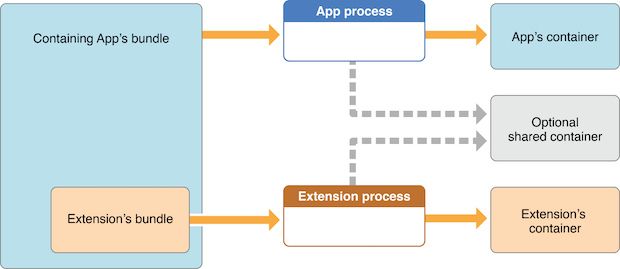
Access to a shared container is gated by entitlements and code signing:
- Each member (containing app and extension) must declare the
com.apple.security.application-groupsentitlement with the same group identifier (for example,group.org.owasp.mastestapp). - App Group identifiers are namespaced to the developer's Apple Developer Team, and the entitlement is enforced by the provisioning profile and code signature. Only binaries signed by the same team and provisioned with that group can join the container.
Members of the same App Group typically exchange data through:
UserDefaults(suiteName:)for shared user defaults.FileManager.containerURL(forSecurityApplicationGroupIdentifier:)for a shared file container, located under/private/var/mobile/Containers/Shared/AppGroup/<UUID>/.- An
NSPersistentContainerconfigured to use the App Group container for shared Core Data storage.
A shared container is also required when an extension uses NSURLSession for background uploads or downloads, so that both the extension and the containing app can access the transferred data.
Two properties of the shared container are relevant when reasoning about the data it holds:
- All members of the App Group have equal read/write access to everything in the shared container; the container has no per-item access control between members.
- Files written to the shared container are protected by Data Protection according to their file protection class, just like files in an app's private container. The default class is
NSFileProtectionCompleteUntilFirstUserAuthentication;NSFileProtectionCompletekeeps file contents encrypted while the device is locked. See File System APIs for the data protection classes.
For credentials and other secrets that both the app and the extension need, the Keychain supports sharing through a Keychain Access Group (keychain-access-groups entitlement), which provides dedicated key storage with its own accessibility controls, independent of the App Group file container.
Declaring Supported Data Types
Share and action extensions declare the data they can receive through the NSExtensionActivationRule key in the extension's Info.plist. The rule lists the supported Uniform Type Identifiers (UTIs) and the maximum item counts, for example:
<key>NSExtensionAttributes</key>
<dict>
    <key>NSExtensionActivationRule</key>
    <dict>
        <key>NSExtensionActivationSupportsImageWithMaxCount</key>
        <integer>10</integer>
        <key>NSExtensionActivationSupportsMovieWithMaxCount</key>
        <integer>1</integer>
        <key>NSExtensionActivationSupportsWebURLWithMaxCount</key>
        <integer>1</integer>
    </dict>
</dict>
More complex matching is possible with a predicate string evaluated against the offered UTIs. NSExtensionActivationRule determines whether the extension is offered to the user for a given item (for example, whether it appears in the share sheet); it filters availability in the host app's UI and is not an access-control boundary on the data itself.