MASTG-TECH-0168: Monitoring UIActivity Data Receiving
Use this technique to observe how an app handles files handed to it via the system Share Sheet, AirDrop, or Mail (see UIActivity Sharing for background on how receiving works).
Before running the technique, read the app's Info.plist (see Exploring the App Package) to identify the document types the app declares it can open (CFBundleDocumentTypes) and any custom UTIs (UTExportedTypeDeclarations / UTImportedTypeDeclarations). That tells you which file types to use as inputs and which open-URL handler methods to expect.
- Share a file with the app from another app, or send it via AirDrop or e-mail. Choose a file type that triggers the "Open with..." dialog (that is, one for which there is no default app, such as a PDF).
- Hook the open-URL handler (
application:openURL:options:and, for scene-based apps,scene:openURLContexts:) and any other methods identified from theInfo.plistinspection. - Observe the app behavior.
- In addition, you can send specifically malformed files and/or apply a fuzzing technique.
To illustrate this with an example, take a real-world File Manager app and follow these steps:
- Send a PDF file from another Apple device (for example a MacBook) via AirDrop.
- Wait for the AirDrop popup to appear and tap Accept.
-
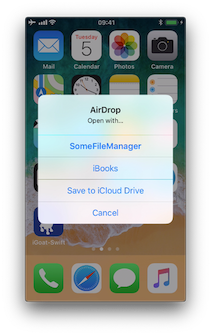
As there is no default app for the file, iOS switches to the Open with... popup. The next screenshot shows this (the display name was modified using Frida (iOS) to conceal the app's real name):
-
After selecting SomeFileManager you can see the following:
(0x1c4077000)  -[AppDelegate application:openURL:options:]
application: <UIApplication: 0x101c00950>
openURL: file:///var/mobile/Library/Application%20Support
                    /Containers/com.some.filemanager/Documents/Inbox/OWASP_MASVS.pdf
options: {
    UIApplicationOpenURLOptionsAnnotationKey =     {
        LSMoveDocumentOnOpen = 1;
    };
    UIApplicationOpenURLOptionsOpenInPlaceKey = 0;
    UIApplicationOpenURLOptionsSourceApplicationKey = "com.apple.sharingd";
    "_UIApplicationOpenURLOptionsSourceProcessHandleKey" = "<FBSProcessHandle: 0x1c3a63140;
                                                                sharingd:605; valid: YES>";
}
0x18c7930d8 UIKit!__58-[UIApplication _applicationOpenURLAction:payload:origin:]_block_invoke
...
0x1857cdc34 FrontBoardServices!-[FBSSerialQueue _performNextFromRunLoopSource]
RET: 0x1
The sending application is com.apple.sharingd and the URL's scheme is file://. Note that once the user selects the app, the system has already moved the file to the app's Inbox. The app then moves it to /var/mobile/Documents/ and removes it from the Inbox:
(0x1c002c760)  -[XXFileManager moveItemAtPath:toPath:error:]
moveItemAtPath: /var/mobile/Library/Application Support/Containers
                            /com.some.filemanager/Documents/Inbox/OWASP_MASVS.pdf
toPath: /var/mobile/Documents/OWASP_MASVS (1).pdf
error: 0x16f095bf8
0x100f24e90 SomeFileManager!-[AppDelegate __handleOpenURL:]
0x100f25198 SomeFileManager!-[AppDelegate application:openURL:options:]
0x18c7930d8 UIKit!__58-[UIApplication _applicationOpenURLAction:payload:origin:]_block_invoke
...
0x1857cd9f4 FrontBoardServices!__FBSSERIALQUEUE_IS_CALLING_OUT_TO_A_BLOCK__
RET: 0x1
The stack trace shows that application:openURL:options: called __handleOpenURL:, which called moveItemAtPath:toPath:error:. This information was obtained without source code: the first hook (application:openURL:options:) is obvious, and the rest requires tracing candidate methods (for example, anything containing "copy", "move", or "remove") until you find the one actually called.
This way of handling incoming files is the same for custom URL schemes. Refer to Testing Custom URL Schemes for more information.