MASTG-KNOW-0020: Inter-Process Communication (IPC) Mechanisms
Every Android process runs in its own sandboxed address space. Inter-process communication (IPC) lets apps and the system exchange data and invoke functionality across these process boundaries. Instead of relying on traditional techniques such as shared files or network sockets, Android provides higher-level IPC mechanisms built on a common foundation. This article gives an overview of those mechanisms and links to the detailed knowledge articles for each.
Binder
Android's IPC is based on Binder, a custom kernel driver and framework derived from OpenBinder. Most Android system services and all high-level IPC mechanisms depend on it. The term Binder refers to several related concepts:
- Binder driver: the kernel-level driver exposed as the
/dev/bindercharacter device. - Binder protocol: the low-level
ioctl-based protocol used to communicate with the driver. IBinderinterface: the well-defined behavior that Binder objects implement.- Binder object, service, and client: the implementation exposing functionality and the objects that consume it.
The Binder framework follows a client-server model. To make an IPC call, an app invokes a method on a proxy object. The proxy marshals the parameters into a parcel and sends a transaction to the Binder server, which holds a thread pool to handle incoming requests and dispatches the call to the target object. From the caller's perspective this looks like an ordinary method call; the framework performs the marshalling and transport.
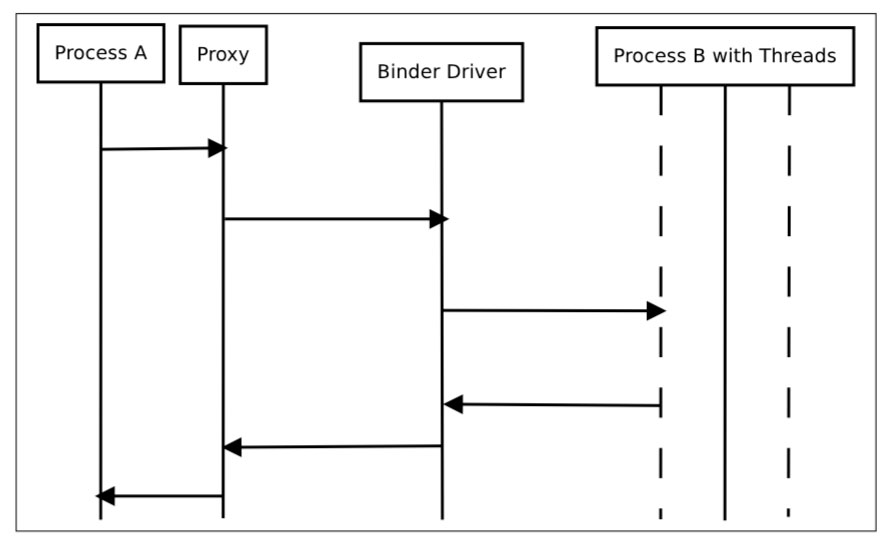
Services that allow other apps to bind to them are called bound services and provide an IBinder interface to clients. Developers commonly use the Android Interface Definition Language (AIDL) to define remote interfaces. The ServiceManager system daemon registers system services and resolves them by name. You can list the registered system services with the service list command:
adb shell service list
Intents
Intent messaging is an asynchronous communication framework built on top of Binder. An Intent is a messaging object used to request an action from another app component. Intents support three fundamental use cases:
- Starting an activity by passing an intent to
startActivity(see Android Activities). - Starting or binding to a service by passing an intent to
startServiceorbindService(see Android Services). - Delivering a broadcast by passing an intent to
sendBroadcastorsendOrderedBroadcast(see Android Broadcast Receivers).
Intents can be explicit (naming the target component) or implicit (describing an action that the system resolves to a component based on its <intent-filter> declarations). For details, see Explicit vs Implicit Intents. Related intent-based concepts are covered in Pending Intents (Pending Intents) and Deep Links (Deep Links).
App Components as IPC Entry Points
Four app component types act as IPC entry points. Each is declared in the AndroidManifest.xml file and its visibility to other apps is controlled by the android:exported attribute and, optionally, permission attributes. For the permission model behind these controls, including protection levels, component permission enforcement, and custom permissions, see App Permissions:
- Activities provide user-interface screens that other apps can start. See Android Activities.
- Services run background operations that other apps can start or bind to. See Android Services.
- Broadcast Receivers respond to broadcast messages from other apps and the system. See Android Broadcast Receivers.
- Content Providers expose structured data through a URI-based interface. See Android ContentProvider.
Other IPC Mechanisms
Apps can also exchange data through mechanisms that aren't tied to a specific component type, including the clipboard, Messenger objects, shared files exposed through a FileProvider, and local sockets. The component-based mechanisms above are the most common entry points exposed to other apps.