MASTG-KNOW-0072: Server Trust Evaluation
ATS imposes extended security checks that supplement the default server trust evaluation prescribed by the Transport Layer Security (TLS) protocol. Loosening ATS restrictions reduces the security of the app. Apps should prefer alternative ways to improve server security before adding ATS exceptions.
The Apple Developer Documentation explains that an app can use URLSession to automatically handle server trust evaluation. However, apps are also able to customize that process, for example they can:
- bypass or customize certificate expiry.
- loosen/extend trust: accept server credentials that would otherwise be rejected by the system, e.g. to make secure connections to a development server using self-signed certificates embedded in the app.
- tighten trust: reject credentials that would otherwise be accepted by the system.
- etc.
Whenever an app accesses URLAuthenticationChallenge — which only happens when it implements an authentication-challenge delegate method such as urlSession(_:didReceive:completionHandler:) or webView(_:didReceive:completionHandler:) — it has taken over part of the server trust evaluation from the system. This is true regardless of whether the implementation ultimately calls SecTrustEvaluateWithError: the mere presence of custom challenge handling means the default ATS-enforced evaluation is being supplemented or replaced, and every such code path should be reviewed manually.
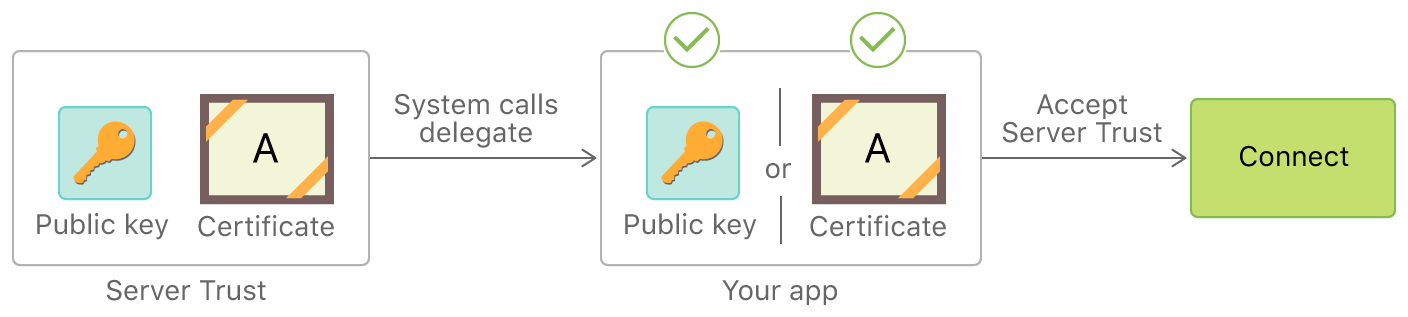
References:
- Preventing Insecure Network Connections
- Performing Manual Server Trust Authentication
- Certificate, Key, and Trust Services
Certificate Pinning
Certificate pinning allows an iOS app to reject certificates that don't match a specific expected identity, guarding against Machine-in-the-Middle (MITM) attacks even when an attacker controls a CA that is trusted by the system.
Because pinning is layered on top of standard HTTPS, it does not weaken the underlying TLS connection. The risk lies in misconfiguration rather than in the mechanism itself. If pins are not maintained correctly, for example pinning a public key without providing a backup pin, or failing to update the pinned values before the server's certificate or key is rotated, the app will reject otherwise valid connections and break communication with the affected endpoints. This makes pinning misconfiguration an availability risk for the APIs the app depends on. For more general details on pinning, refer to Insecure Identity Pinning.
Important Considerations:
Certificate pinning is a hardening practice, but it's not foolproof. There are multiple ways an attacker can bypass it, such as:
- Modifying the certificate validation logic in the app's
URLSessionDelegateor customSecTrustevaluation. - Replacing pinned certificates stored in the app bundle.
- Altering or removing pins in the
Info.plistNSPinnedDomainsconfiguration.
Any such modification invalidates the app's code signature, requiring the attacker to re-sign the app. To mitigate these risks, additional protections such as integrity checks and runtime verification may be required.
Pinning via App Transport Security (ATS)
Apple's Identity Pinning feature lets you declare expected CA public key hashes directly in the Info.plist file under NSPinnedDomains. This is the recommended approach because it requires no code changes and is enforced by the system for connections made through the URL Loading System.
<key>NSAppTransportSecurity</key>
<dict>
    <key>NSPinnedDomains</key>
    <dict>
        <key>example.com</key>
        <dict>
            <key>NSIncludesSubdomains</key>
            <true/>
            <key>NSPinnedCAIdentities</key>
            <array>
                <dict>
                    <key>SPKI-SHA256-BASE64</key>
                    <string>+[BASE64-ENCODED SHA-256 HASH OF SUBJECT PUBLIC KEY INFO]</string>
                </dict>
            </array>
        </dict>
    </dict>
</dict>
The NSPinnedCAIdentities key pins an intermediate or root CA's public key. You can alternatively use NSPinnedLeafIdentities to pin the leaf (server) certificate's public key, though pinning to a CA is more resilient to certificate renewals.
Important Considerations:
- Backup Pins: Apple recommends including at least one backup pin (a different CA or leaf key) to maintain connectivity if the primary certificate changes unexpectedly.
- No Expiration Support: Unlike the Android Network Security Configuration,
NSPinnedDomainsdoesn't support expiration dates. Developers must manage certificate rotation manually. - Scope: ATS pinning applies only to connections made via the URL Loading System (for example,
URLSession). It doesn't apply toNetworkframework,CFNetwork, or BSD socket connections.
Pinning via Manual Server Trust Evaluation
Apps can implement pinning in code by implementing the URLSessionDelegate method urlSession(_:didReceive:completionHandler:) to perform manual server trust authentication. This approach gives full programmatic control over which credentials to accept.
A typical implementation extracts the server's SecTrust from the authentication challenge, then compares the certificate's or public key's fingerprint against a hardcoded expected value.
Important Note: Manual trust evaluation is error-prone. Common mistakes include:
- Calling
completionHandler(.useCredential, ...)unconditionally without verifying the certificate. - Forgetting to call
completionHandler(.cancelAuthenticationChallenge, nil)on mismatch, leaving the connection open. - Using certificate-level pinning instead of public key pinning, which requires an app update on every certificate renewal.
Pinning via Third-party Libraries
Several third-party libraries simplify certificate pinning on iOS:
- TrustKit: Configure public key hashes in
Info.plistor in code. TrustKit swizzlesNSURLSessionandNSURLConnectiondelegates to enforce pinning transparently. - Alamofire: Define a
ServerTrustManagerwith aPinnedCertificatesTrustEvaluatororPublicKeysTrustEvaluatorper domain. See the Alamofire Security documentation for details.
These libraries typically provide higher-level abstractions over the URLSession delegate mechanism, but they may not cover all network traffic in the app (for example, traffic from native code or third-party SDKs with their own network stacks).
Pinning in WebViews
WKWebView doesn't expose a direct API for certificate pinning equivalent to URLSession's delegate. However, you can intercept navigation requests using WKNavigationDelegate and the method webView(_:didReceive:completionHandler:) to perform custom trust evaluation, similar to the URLSession delegate approach.
Note that this method only covers top-level navigation challenges. Sub-resource loads (images, scripts, XHR) inside a WKWebView aren't covered, so this approach provides incomplete pinning coverage for web content.
Pinning in Native Code
Pinning can also be implemented in native (C/C++) code using the Security framework's lower-level SecTrust APIs or via the Network framework. Embedding certificate or public key verification within compiled native libraries increases the difficulty of bypassing or modifying pinning via typical IPA reverse engineering, but it also makes maintenance and debugging more complex.
Pinning in Cross-Platform Frameworks
Cross-platform frameworks (Flutter, React Native, Cordova, Xamarin) often require special considerations for certificate pinning, because they may use their own network stack instead of the platform's URL Loading System:
- Flutter: Uses Dart's
HttpClientbacked by BoringSSL, bypassing ATS entirely. Certificate pinning must be implemented at the Dart level usingSecurityContextor a custombadCertificateCallback, or via a native plugin. - React Native: Network requests go through the native iOS networking stack by default, so ATS and
URLSession-based pinning can apply. Third-party plugins (for example,react-native-ssl-pinning) also exist. - Cordova / Ionic: Requests from JavaScript are typically made through a
WKWebView. See the WebViews section above, and also consider Cordova plugins that add native pinning support.
Understanding how a framework handles networking is crucial for ensuring that pinning is actually enforced.