MASTG-KNOW-0001: Biometric Authentication
Android provides platform support for biometric authentication, such as fingerprint and face recognition, and exposes it to apps through the biometric APIs. At the framework level, Android includes support for face and fingerprint authentication, and device implementations can also support other biometric modalities. Biometric integration on Android is classified by biometric security, not only by modality. See the Android Open Source Project overview and the Android Developers guide.
For app development, use the recommended Jetpack Biometric library, with the package name prefix androidx.biometric. This library provides compatibility wrappers around the platform biometric APIs and expands on the deprecated FingerprintManager API, with support back to Android 6.0 (API level 23).
It brings the classes BiometricPrompt, BiometricManager, authenticator constants, and related APIs to older Android versions and support for device credential authentication with a CryptoObject on Android 11 (API level 30) and higher.
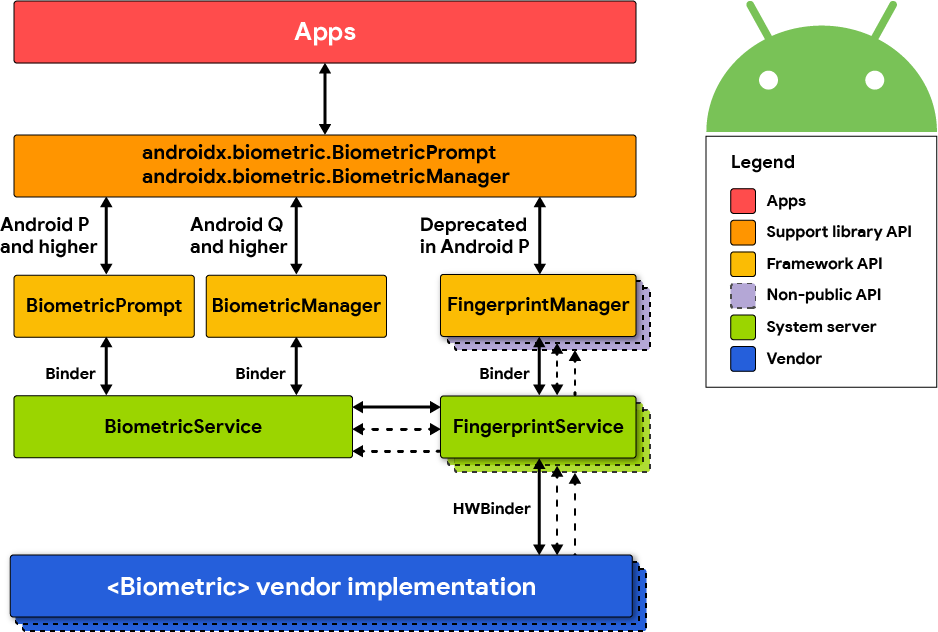
Main APIs
Android biometric authentication is typically built around the following components.
BiometricPrompt
BiometricPrompt displays a system-provided authentication dialog and returns the authentication result to the app. The prompt UI is rendered by the system, giving apps a consistent interface across devices and biometric modalities.
BiometricPrompt can be used with a PromptInfo object to configure the dialog title, subtitle, allowed authenticators, and whether explicit confirmation is requested after a passive biometric is accepted.
BiometricManager
BiometricManager is used to query whether the requested authenticators are available and usable on the device. This check is performed with canAuthenticate(int), using one or more authenticator constants.
FingerprintManager
FingerprintManager was the earlier fingerprint-specific API. It was deprecated in Android 9 (API level 28) in favor of the biometric APIs and is superseded by the Jetpack Biometric library.
Authenticator Types
Android allows apps to declare which authenticator types they support through BiometricManager.Authenticators and BiometricPrompt.PromptInfo.Builder.setAllowedAuthenticators(). The main constants are:
BIOMETRIC_STRONG: authentication using a Class 3 biometric.BIOMETRIC_WEAK: authentication using a Class 2 biometric.DEVICE_CREDENTIAL: authentication using the device screen lock credential, such as PIN, pattern, or password.
The biometric classes are based on their spoof and imposter acceptance rates.
Apps can allow a single authenticator type or a bitwise combination of compatible types, for example BIOMETRIC_STRONG | DEVICE_CREDENTIAL. The supported combinations depend on platform version and device capabilities.
To use biometric authenticators, the user must first have a secure device credential configured. If none is configured, the biometric enrollment flow prompts the user to create one.
Authentication Flows
From an API perspective, local authentication flows on Android generally appear in two forms.
Prompt-Based Authentication
In a prompt-based flow, the app displays BiometricPrompt and receives a success, failure, or error callback. The prompt may be configured to accept biometrics only, device credentials only, or a combination of allowed authenticators.
Keystore-Backed Authentication
Android Keystore can associate key usage with user authentication requirements. In this model, an app generates or imports a key into the Android Keystore, defines how and when the key may be used, and then uses BiometricPrompt to authorize a cryptographic operation through a CryptoObject.
The Android Keystore system stores key material in a secure way, keeps key material non-exportable, and can bind key material to secure hardware such as a Trusted Execution Environment (TEE) or Secure Element (SE) when supported by the device. The Keystore also lets apps define authorizations for key usage, including user authentication requirements.
BiometricPrompt.CryptoObject can wrap cryptographic primitives such as Cipher, Signature, or Mac instances so that the authenticated result is tied to a specific cryptographic operation.
Authentication Parameters in the Keystore
When creating a key with KeyGenParameterSpec.Builder, apps can define authentication-related parameters. The current API for configuring the validity window is setUserAuthenticationParameters(int timeout, int type), where a timeout of 0 requires authentication for every individual cryptographic operation.
setUserAuthenticationValidityDurationSeconds(int) is deprecated from API level 30 in favor of setUserAuthenticationParameters(int, int).
When a key only supports biometric credentials, it's invalidated by default when new biometrics are enrolled. This behavior can be controlled with setInvalidatedByBiometricEnrollment(boolean).
Third-Party SDKs
Some apps use third-party SDKs that expose biometric features. On Android, biometric authentication is ultimately integrated with the platform biometric and Keystore infrastructure. Knowledge about a given SDK depends on how it maps to the Android biometric APIs, authenticator classes, and Keystore-backed cryptographic operations.