MASTG-KNOW-0019: Deep Links
Deep links are URIs of any scheme that take users directly to specific content in an app. An app can set up deep links by adding intent filters on the Android Manifest and extracting data from incoming intents to navigate users to the correct activity.
For a large-scale analysis of how Android apps implement and handle deep links, see the research paper "Measuring the Insecurity of Mobile Deep Links of Android".
Android supports two types of deep links:
- Custom URL Schemes, which are deep links that use any custom URL scheme, e.g.
myapp://(not verified by the OS). - Android App Links (Android 6.0 (API level 23) and higher), which are deep links that use the
http://andhttps://schemes and contain theautoVerifyattribute (which triggers OS verification).
Deep Link Collision:
Using unverified deep links can cause a significant issue- any other apps installed on a user's device can declare and try to handle the same intent, which is known as deep link collision. Any arbitrary application can declare control over the exact same deep link belonging to another application.
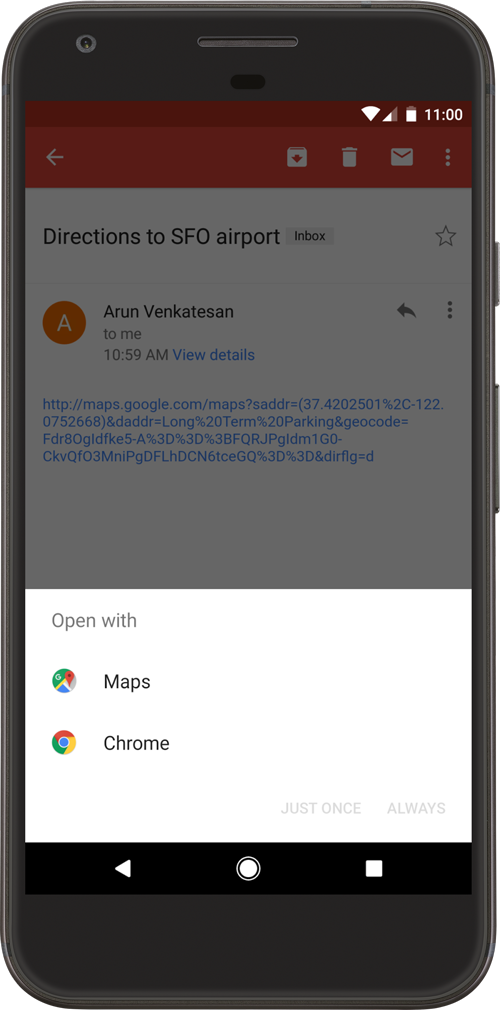
In recent versions of Android this results in a so-called disambiguation dialog shown to the user that asks them to select the application that should handle the deep link. The user could make the mistake of choosing a malicious application instead of the legitimate one.
Android App Links:
In order to solve the deep link collision issue, Android 6.0 (API Level 23) introduced Android App Links, which are verified deep links based on a website URL explicitly registered by the developer. Clicking on an App Link will immediately open the app if it's installed.
There are some key differences from unverified deep links:
- App Links only use
http://andhttps://schemes, any other custom URL schemes are not allowed. - App Links require a live domain to serve a Digital Asset Links file via HTTPS.
- App Links do not suffer from deep link collision since they don't show a disambiguation dialog when a user opens them.
Declaring Deep Links
Deep links are declared with <intent-filter> elements on an <activity> in the AndroidManifest.xml. A browsable web deep link combines the android.intent.action.VIEW action, the android.intent.category.DEFAULT and android.intent.category.BROWSABLE categories, and one or more <data> elements that define the scheme, host, and path.
<data> elements within the same <intent-filter> are merged across all combinations of their attributes. See Listing Deep Links for how to enumerate the resulting deep links.
App Link Verification
An app opts into App Link verification by adding android:autoVerify="true" to the <intent-filter>. When the app is installed, Android reaches out to each declared android:host and checks the Digital Asset Links file served at https://<host>/.well-known/assetlinks.json. A deep link is treated as an App Link only after this verification succeeds.
Verification depends on the Digital Asset Links file being reachable and correct:
- It must be served over HTTPS and list the app's package name and signing certificate fingerprint.
- A server-side redirect (for example,
httptohttps, orexample.comtowww.example.com) stops Android from verifying the affected links. - Each declared host, including every subdomain, needs its own file. A wildcard host (such as
*.example.com) is verified against the file at the root domain.
The Android version also affects verification behavior:
- Before Android 12 (API level 31), a single non-verifiable link (for example, a missing
autoVerify, an invalid Digital Asset Links file, or a custom URL scheme in a verified intent filter) can cause the system to skip verification for all of the app's App Links. - Starting with Android 12 (API level 31), a generic web intent resolves to the user's default browser unless the target app is approved for the specific domain in the intent.
You can inspect the verification state on a device as described in Verifying App Link Website Association.
Handling Incoming Deep Links
The activity declared for a deep link receives the incoming URI through the Intent that launched it. The handler typically obtains it with getIntent() followed by Intent.getData(), or through onNewIntent() when the activity is already running.
Individual components of the resulting Uri are read with methods such as getQueryParameter(), getPathSegments(), and getLastPathSegment(). See Custom URL Scheme Handler Without Input Validation with semgrep for a handler that reads a query parameter from an incoming deep link.
Unlike iOS, which exposes the caller's bundle identifier through the sourceApplication property, Android provides no built-in mechanism for a deep link handler to identify which app sent the Intent. Any app on the device can send an Intent that matches an exported intent filter.