MASTG-KNOW-0076: WebViews
WebViews are in-app browser components for displaying interactive web content. They can be used to embed web content directly into an app's user interface. iOS WebViews execute JavaScript and render HTML, and therefore can execute injected scripts when untrusted content is rendered.
Types of WebViews
There are multiple ways to include a WebView in an iOS application.
WKWebView
WKWebView was introduced with iOS 8 and is the appropriate choice for extending app functionality, controlling displayed content (i.e., prevent the user from navigating to arbitrary URLs) and customizing.
WKWebView comes with several security advantages over UIWebView:
- JavaScript is enabled by default but it can be completely disabled using the
javaScriptEnabledproperty ofWKWebView, which helps mitigate script injection attacks by preventing injected scripts from executing. - The
javaScriptCanOpenWindowsAutomaticallyproperty can be used to prevent JavaScript from opening new windows, such as pop-ups. WKWebViewimplements out-of-process rendering, so memory corruption bugs won't affect the main app process.
A JavaScript Bridge can be enabled when using WKWebView and UIWebView. See Section "WebView-Native Bridges" below for more information.
SFSafariViewController
SFSafariViewController is available starting on iOS 9 and should be used to provide a generalized web viewing experience. These WebViews can be easily spotted as they have a characteristic layout which includes the following elements:
- A read-only address field with a security indicator.
- An Action ("Share") button.
- A Done button, back and forward navigation buttons, and a "Safari" button to open the page directly in Safari.
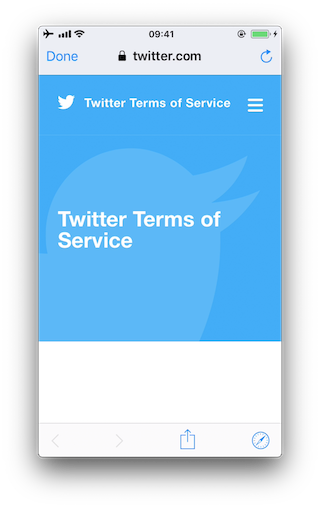
There are a couple of things to consider:
- JavaScript cannot be disabled in
SFSafariViewControllerand this is one of the reasons why the usage ofWKWebViewis recommended when the goal is extending the app's user interface. SFSafariViewControlleralso shares cookies and other website data with Safari.- The user's activity and interaction with a
SFSafariViewControllerare not visible to the app, which cannot access AutoFill data, browsing history, or website data. - According to the App Store Review Guidelines,
SFSafariViewControllers may not be hidden or obscured by other views or layers.
This should be sufficient for an app analysis and therefore, SFSafariViewControllers are out of scope for the Static and Dynamic Analysis sections.
UIWebView (DEPRECATED since iOS 12, don't use)
UIWebView was deprecated by Apple in iOS 12 and has since been superseded by WKWebView and SFSafariViewController for embedding web content. Reasons commonly cited include its older security model, the lack of support for disabling JavaScript, and the availability of more modern configuration and isolation controls in its successors.
WebView Network Security
The engine behind iOS WebViews is WebKit, which is also used by the Safari browser. This means that WebViews are subject to the same network security policies as Safari, including App Transport Security (ATS) and mixed content restrictions. However, developers can configure these policies differently for WebViews than for the rest of the app, which can lead to security issues if not done carefully.
ATS
iOS WebViews are subject to the same App Transport Security (ATS) policies as the rest of the app. ATS has a specific policy for WebViews, which allows developers to relax security for web content while keeping the rest of the app secure. This is controlled by the NSAllowsArbitraryLoadsInWebContent key in the app's Info.plist file. If this key is set to true, it allows WebViews to load content over insecure HTTP connections, even if the rest of the app is restricted by ATS.
Mixed Content
WebViews can load both HTTP and HTTPS content, which may lead to mixed content situations. Mixed content occurs when an HTTPS page attempts to load resources such as scripts, images, or iframes over HTTP. This weakens the security guarantees of the HTTPS page because the insecure resource could be modified by an attacker. You can learn more about mixed content in the "Mozilla Docs for Mixed Content" and in the "web.dev article for Fixing mixed content".
Mixed content is typically divided into active and passive types. Active mixed content includes resources that can execute or modify the page, such as scripts, stylesheets, or iframes. Passive mixed content includes resources such as images, audio, or video that are displayed but do not directly execute code. In modern browsers and WebKit, active mixed content is blocked, while passive mixed content is often automatically upgraded to HTTPS if possible, or otherwise blocked and reported with a warning.
In WKWebView, active mixed content such as HTTP scripts loaded by an HTTPS page is generally blocked by WebKit itself, even if the application relaxes App Transport Security. For example, setting NSAllowsArbitraryLoadsInWebContent allows insecure network requests from WebViews from the ATS perspective, but it does not disable WebKit's mixed content protections. As a result, an HTTPS page that tries to load an HTTP script will typically have that resource blocked. See "WebKit Features in Safari 18.0" (September 2024).
The API hasOnlySecureContent can be used after a page finishes loading to determine whether the WebView ultimately loaded only secure resources. However, it is informational rather than preventive. It reflects the final security state of the page, not whether the page attempted to load insecure resources that were blocked.
Because WebKit enforces these protections and they cannot be disabled through public WKWebView APIs, active mixed content can only be loaded when the page itself is requested over HTTP, regardless of ATS settings such as NSAllowsArbitraryLoadsInWebContent.
Loading Content
Loading Remote URLs
iOS apps can load remote URLs into a WebView using the load(_:) API, which starts a top level navigation from the supplied URLRequest.
WKWebView network communication sits on top of URLSession, so its load(_:) API is subject to App Transport Security.
Loading Local Files
When loading local files, developers typically use one of the following methods:
loadHTMLString:baseURL:: loads HTML content from a string with a specified base URL.loadData:MIMEType:characterEncodingName:baseURL:: loads data with a specified MIME type and base URL.loadFileURL:allowingReadAccessToURL:: loads a file from the local file system with controlled read access.loadFileRequest:allowingReadAccessToURL:: loads a file from the local file system with controlled read access using aURLRequest.
The baseURL parameter in the first two methods determines the effective origin of the loaded content:
- For
WKWebView: settingbaseURLtonilsets the effective origin to"null", which is treated as an opaque origin and is not considered the same as other origins under the same-origin policy. - For
UIWebView(DEPRECATED since iOS 12, don't use): settingbaseURLtonilresults in an effective origin with theapplewebdata://scheme, which does not apply the same-origin policy in the same way and may allow the loaded content to access local files.
In contrast to Android, iOS enforces a per-load directory boundary through allowingReadAccessTo. When using loadFileURL:allowingReadAccessToURL: or loadFileRequest:allowingReadAccessToURL:, file access is primarily constrained by the allowingReadAccessToURL boundary combined with the app sandbox. In contrast, on Android, file access behavior is primarily controlled by WebView settings that modify how file:// origins interact with other files and network resources, and there is no direct per load directory restriction equivalent to allowingReadAccessToURL.
If it points to a single file, only that file will be accessible. Example:
var fileURL = FileManager.default.urls(for: .libraryDirectory, in: .userDomainMask)[0]
fileURL = fileURL.appendingPathComponent("index.html")
wkWebView.loadFileURL(fileURL, allowingReadAccessTo: fileURL)
If it points to a directory, all files in that directory will be accessible to the WebView. Example:
var dirURL = FileManager.default.urls(for: .libraryDirectory, in: .userDomainMask)[0]
var fileURL = dirURL.appendingPathComponent("index.html")
wkWebView.loadFileURL(fileURL, allowingReadAccessTo: dirURL) // All files in dirURL are accessible
WebView File Access
WebViews in iOS can be configured to allow access to local files using the file:// URL scheme. The behavior and configurability differ between UIWebView and WKWebView.
WKWebView File Access from File URLs
On iOS these are internal WebKit preferences and are not public WKWebView APIs. Attempting to set them through key value coding is unsupported and may stop working across system versions.
Conceptually they influence how the web security model treats file:// origins.
The following properties can be used to configure file access (both are undocumented and must be set via Key-Value Coding, i.e. by using setValue:forKey:):
allowFileAccessFromFileURLs(WKPreferences,falseby default): enables JavaScript running in the context of afile://scheme URL to access content from otherfile://scheme URLs.allowUniversalAccessFromFileURLs(WKWebViewConfiguration,falseby default): enables JavaScript running in the context of afile://scheme URL to access content from any origin.
allowingReadAccessTo and the undocumented allowFileAccessFromFileURLs and allowUniversalAccessFromFileURLs do not govern the same scope. allowingReadAccessTo affects direct local document loading by the WebView, whereas the undocumented preferences affect whether JavaScript running in a file:// origin can access additional local or cross-origin resources. That's why, even if loadFileURL(_:allowingReadAccessTo:) is restricted to a single file or directory, enabling these unsupported preferences can allow fetch and XMLHttpRequest to reach local files that would not be reachable through direct HTML embedding or iframe navigation alone.
UIWebView File Access (DEPRECATED since iOS 12, don't use)
UIWebView has both allowFileAccessFromFileURLs and allowUniversalAccessFromFileURLs enabled by default and doesn't offer an option to disable them. This makes UIWebView inherently insecure for loading local content, especially if JavaScript is enabled (which cannot be disabled in UIWebView).
Notes on Exploitation
Broad file read access alone does not expose data. Exploitation generally requires several factors. The attacker must be able to execute JavaScript in the WKWebView, for example through injected HTML, attacker-controlled pages loaded by the app, deep links that open untrusted content in a WebView, or exposed JavaScript bridges.
If these conditions are met, enabling the undocumented allowFileAccessFromFileURLs preference can allow JavaScript running in a file:// context to read additional local files using mechanisms such as fetch or XMLHttpRequest. This scope is distinct from the direct document loading scope controlled by loadFileURL(_:allowingReadAccessTo:) where access remains limited to locations the app can read, such as its sandboxed files.
Once data is accessible to JavaScript, exfiltration usually relies on standard WebView networking capabilities. A common mechanism is sending the data to an attacker-controlled server using web APIs such as fetch or XMLHttpRequest. For this to work across origins, the WebView must also permit such requests, for example through the undocumented allowUniversalAccessFromFileURLs preference, and the destination server must allow the cross-origin request, for example by returning appropriate CORS headers such as Access-Control-Allow-Origin.
WebView-Native Bridges
iOS WebViews provide a means of communication between the WebView and the native Swift or Objective-C code. Any important data or native functionality exposed to the WebView JavaScript engine would also be accessible to rogue JavaScript running in the WebView.
WKWebView
JavaScript code in a WKWebView can send messages back to the native app. This communication is implemented using a messaging system and using the postMessage function, which automatically serializes JavaScript objects into native Objective-C or Swift objects. Message handlers are configured using the method add(_ scriptMessageHandler:name:).
UIWebView (DEPRECATED since iOS 12, don't use)
There are two fundamental ways of how native code and JavaScript can communicate:
- JSContext: When an Objective-C or Swift block is assigned to an identifier in a
JSContext, JavaScriptCore automatically wraps the block in a JavaScript function. - JSExport protocol: Properties, instance methods and class methods declared in a
JSExport-inherited protocol are mapped to JavaScript objects that are available to all JavaScript code. Modifications of objects that are in the JavaScript environment are reflected in the native environment.
Note that only class members defined in the JSExport protocol are made accessible to JavaScript code.