MASTG-TECH-0061: Dumping KeyChain Data
Dumping Keychain data can be done with multiple tools, but not all of them work on all iOS versions. As is often the case, try different tools or consult their documentation for information on the latest supported versions.
Objection (Jailbroken / non-Jailbroken)
The KeyChain data can be easily viewed in objection (iOS). First, connect objection to the iGoat-Swift app as described in "Recommended Tools - Objection". Then, use the ios keychain dump command to get an overview of the keychain:
$ objection -n "iGoat-Swift" start
... [usb] # ios keychain dump
...
Note: You may be asked to authenticate using the devices passcode or TouchID
Save the output by adding `--json keychain.json` to this command
Dumping the iOS keychain...
Created                    Accessible                      ACL    Type      Account              Service                     Data
-------------------------  ------------------------------  -----  --------  -------------------  --------------------------  ----------------------------------------------------------------------
2019-06-06 10:53:09 +0000  WhenUnlocked                    None   Password  keychainValue        com.highaltitudehacks.dvia  mypassword123
2019-06-06 10:53:30 +0000  WhenUnlockedThisDeviceOnly      None   Password  SCAPILazyVector      com.toyopagroup.picaboo     (failed to decode)
2019-06-06 10:53:30 +0000  AfterFirstUnlockThisDeviceOnly  None   Password  fideliusDeviceGraph  com.toyopagroup.picaboo     (failed to decode)
2019-06-06 10:53:30 +0000  AfterFirstUnlockThisDeviceOnly  None   Password  SCDeviceTokenKey2    com.toyopagroup.picaboo     00001:FKsDMgVISiavdm70v9Fhv5z+pZfBTTN7xkwSwNvVr2IhVBqLsC7QBhsEjKMxrEjh
2019-06-06 10:53:30 +0000  AfterFirstUnlockThisDeviceOnly  None   Password  SCDeviceTokenValue2  com.toyopagroup.picaboo     CJ8Y8K2oE3rhOFUhnxJxDS1Zp8Z25XzgY2EtFyMbW3U=
OWASP.iGoat-Swift on (iPhone: 12.0) [usb] # quit
Note that currently, the latest versions of frida-server and objection do not correctly decode all keychain data. Different combinations can be tried to increase compatibility. For example, the previous printout was created with frida-tools==1.3.0, frida==12.4.8, and objection==1.5.0.
Finally, since the keychain dumper runs within the application context, it will only print keychain items accessible to the application and not the entire keychain of the iOS device.
Grapefruit (Jailbroken / non-Jailbroken)
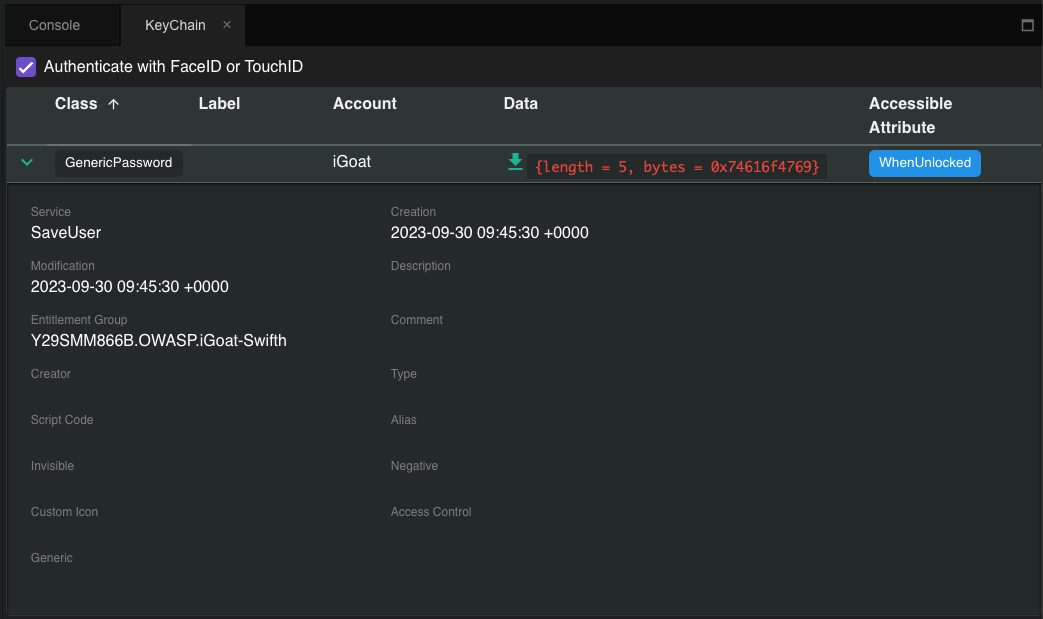
With Grapefruit, it's possible to access the keychain data of the app you have selected. Inside the Storage section, click on Keychain, and you can see a listing of the stored Keychain information.
Keychain-dumper (Jailbroken)
You can use Keychain-Dumper to dump the jailbroken device's KeyChain contents. Once you have it running on your device:
iPhone:~ root# /tmp/keychain_dumper

(...)

Generic Password
----------------
Service: myApp
Account: key3
Entitlement Group: RUD9L355Y.sg.vantagepoint.example
Label: (null)
Generic Field: (null)
Keychain Data: SmJSWxEs

Generic Password
----------------
Service: myApp
Account: key7
Entitlement Group: RUD9L355Y.sg.vantagepoint.example
Label: (null)
Generic Field: (null)
Keychain Data: WOg1DfuH
In newer versions of iOS (iOS 11 and up), additional steps are necessary. See the README.md for more details. Note that this binary is signed with a self-signed certificate that has a "wildcard" entitlement. The entitlement grants access to all items in the Keychain. If you are paranoid or have highly sensitive private data on your test device, you may want to build the tool from source and manually sign the appropriate entitlements into your build; instructions are available in the GitHub repository.
Tests
MASTG-TEST-0052: Testing Local Data Storage MASTG-TEST-0302: Sensitive Data Unencrypted in Private Storage Files